Intel Open VINO
OpenVINO
OpenVINO™ toolkit: An open-source solution for optimizing and deploying AI inference, in domains such as computer vision, automatic speech recognition, natural language processing, recommendation systems, and more. With its plug-in architecture, OpenVINO allows developers to write once and deploy anywhere. We are proud to announce the release of OpenVINO 2023.0 introducing a range of new features, improvements, and deprecations aimed at enhancing the developer experience.
- Enables the use of models trained with popular frameworks, such as TensorFlow and PyTorch.
- Optimizes inference of deep learning models by applying model retraining or fine-tuning, like post-training quantization.
- Supports heterogeneous execution across Intel hardware, using a common API for the Intel CPU, Intel Integrated Graphics, Intel Discrete Graphics, and other commonly used accelerators.
OpenVINO Runtime SDK
2023.3
Overall updates
- Proxy & hetero plugins have been migrated to API 2.0, providing enhanced compatibility and stability.
- Symbolic shape inference preview is now available, leading to improved performance for LLMs.
- OpenVINO's graph representation has been upgraded to opset12, introducing a new set of operations that offer enhanced functionality and optimizations.
2024.3
Overall updates
- NPU Device Plugin support.
2026.1
Overall updates
- Expanded GenAI/VLM model support.
- Improved NPU, GPU, and Model Server performance for edge and local AI deployment.
Applications
OpenVINO 2023.3 for Edge AI SDK 3.0.0
Vision Application
| Application | Model | AI Compute Units |
|---|---|---|
| Object Detection | yolov3 (tf) | CPU, iGPU, dGPU |
| Person Detection | person-detection-retail-0013 | CPU, iGPU, dGPU |
| Face Detection | faceboxes-pytorch | CPU, iGPU, dGPU |
| Pose Estimation | human-pose-estimation-0001 | CPU, iGPU, dGPU |
GenAI Application
| Application | SLM Model (Small Language Model) | AI Compute Units |
|---|---|---|
| SLM Chatbot | Llama-2-7b | CPU, iGPU |
OpenVINO 2024.3 for Edge AI SDK 3.1.0
Vision Application
| Application | Model | AI Compute Units |
|---|---|---|
| Object Detection | yolox | CPU, iGPU, NPU |
| Person Detection | person-detection-retail-0013 | CPU, iGPU, NPU |
| Face Detection | faceboxes-pytorch | CPU, iGPU, NPU |
| Pose Estimation | human-pose-estimation-0001 | CPU, iGPU, NPU |
GenAI Application
| Application | SLM Model (Small Language Model) | AI Compute Units |
|---|---|---|
| SLM Chatbot | Llama-3.1-8b-instruct | CPU, iGPU |
OpenVINO 2026.1
Vision Application
| Application | Model | ARK-2252 |
|---|---|---|
| Object Detection | yolov4 (tf) | CPU : 3.4 FPS iGPU : 18.5 FPS NPU : 22.8 FPS |
| Face Detection | faceboxes-pytorch | CPU : 28.3 FPS iGPU : 32.5 FPS NPU : 33.0 FPS |
| Person Detection | person-detection-retail-0013 | CPU : 50.8 FPS iGPU : 65.8 FPS NPU : 46.7 FPS |
| Pose Estimation | human-pose-estimation-0001 | CPU : 18.8 FPS iGPU : 34.8 FPS NPU : 37.2 FPS |
| Benchmark | ssdlite_mobilenet_v2 | CPU : 240 FPS iGPU : 726 FPS NPU : 1493 FPS |
GenAI Application
| Application | VLM Model | ARK-2252 |
|---|---|---|
| Chatbot | gemma3_4b_int4 | CPU : 5.522 token/s iGPU : 13.743 token/s NPU : 12.923 token/s |
Benchmark
You can refer to the link to test the performance with the benchmark_app.
benchmark_app
The OpenVINO benchmark setup includes a single system with OpenVINO™, as well as the benchmark application installed. It measures the time spent on actual inference (excluding any pre or post processing) and then reports on the inferences per second (or Frames Per Second).
More info: link
Examples
cd /opt/Advantech/EdgeAISuite/Intel_Standard/benchmark

# CPU
$ ./benchmark_app -m ../model/mobilenet-ssd/FP16/mobilenet-ssd.xml -i car.png -t 8 -d CPU

# iGPU
$ ./benchmark_app -m ../model/mobilenet-ssd/FP16/mobilenet-ssd.xml -i car.png -t 8 -d GPU

# NPU
$ ./benchmark_app -m ../model/mobilenet-ssd/FP16/mobilenet-ssd.xml -i car.png -t 8 -d NPU
Utility
XPU-SIM
Intel® XPU Manager is a free and open-source solution for local and remote monitoring and managing Intel® Data Center GPUs. It simplifies administration, maximizes reliability and uptime, and improves utilization.
Intel XPU System Management Interface (SMI): A command line utility for local XPU management.
Key features
- Monitoring GPU utilization and health
- Getting job-level statistics
- Running comprehensive diagnostics
- Controlling power and policy management
- Firmware updating
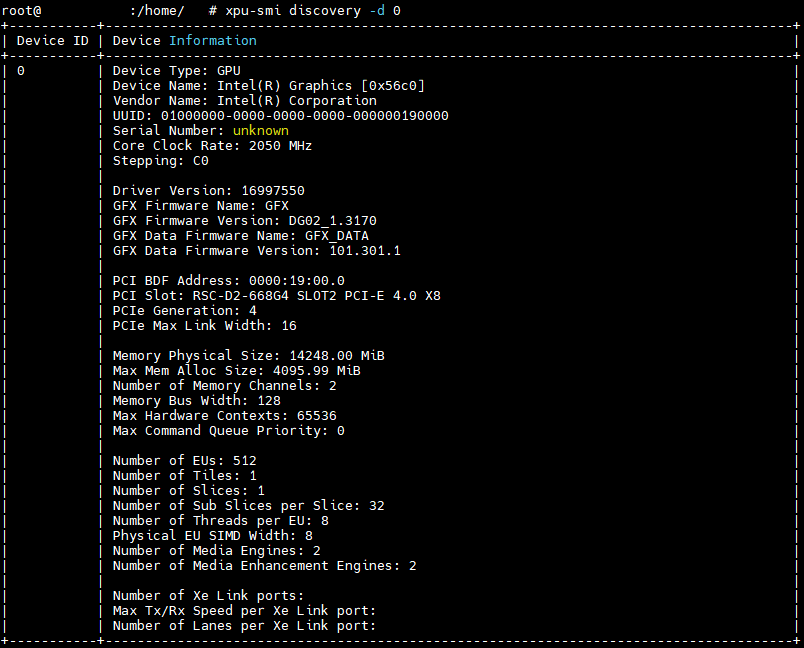
More info: xpu-smi
intel-gpu-tools
Intel GPU Tools is a collection of tools for development and testing of the Intel DRM driver. It includes low-level tools and tests for development and testing of the Intel DRM Driver.
$ sudo intel_gpu_top
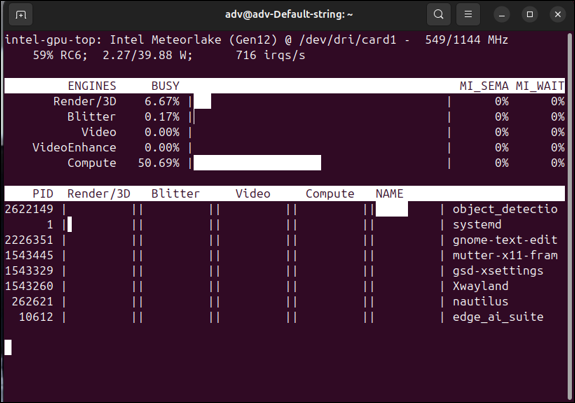
More info: intel-gpu-tools
SoC-Watch
Use Intel® SoC Watch to perform energy analysis on a system running on Intel® architecture. It helps identify behaviors that waste energy.
$ sudo ./socwatch -t 1 -f npu
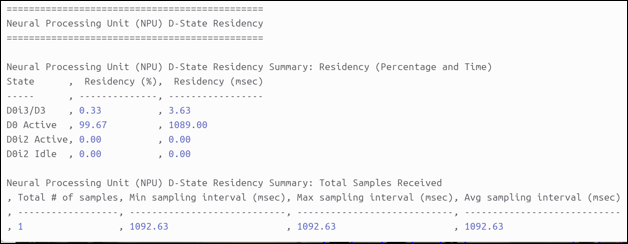
More info: Soc-Watch